Technical writing portfolio

Michele A. Barard

I specialize in creating technical content that connects with the right audience, whether they're installing a server, signing into a clinic's records system, or walking past a screen in a lobby.

Visix · digital signage software · 2009 to 2019 Exym · behavioral health EHR · 2019 to 2022 Innodata · LLM training · 2023 to now Big Easy Website Creation · client help center · 2025 Independent · AI-built apps · 2026
Each sample is marked with who it was written for
General publicEnd usersAdmins & power usersIT & installers

Different users need different messages

When Exym added multi-factor authentication and single sign-on, every audience needed something different: clinicians needed to log in, administrators needed to configure it, and agency leaders needed a reason to turn it on.

Exym · 2020 to 2021Article · email · SMS · rollout

Multi-factor authentication rollout

For agency leaders

A newsletter explainer, "Data Security: Why MFA Matters." It starts with something everyone already uses: your bank card is a thing you have, and your PIN is a thing you know.

For every user, at the login screen

The verification email and a 95-character text message. Both tell people what to do and what happens if a code fails.

The result

98%

adoption across more than 100 client accounts.

Read the article and the message copy

Data Security: Why MFA Matters

The traditional username and password used across the internet are slowly being phased out in favor of new, more secure authentication methods. Passwords are easy for bad actors to acquire. More than half of all people use five or fewer passwords across all their online accounts. Passwords can be stolen from a site, captured by malware, harvested through phishing campaigns, or often just guessed. Adding a second layer of authentication can reduce attacks by 99.9%, according to Microsoft.

Enter Multi-Factor Authentication (MFA). MFA, at its core, is using two or more credentials to access information. These authenticators fall into three broad categories:

  • What you know, such as passwords and PINs,
  • What you have, like cards, email access, and a phone with an app or a specific number for SMS, and
  • What you are, which is mostly comprised of biometric data like fingerprints or facial scans.

Even your bank card uses MFA, a thing you have (your card) plus a thing you know (your PIN).

Excerpt · Exym client newsletter, January 2021

Verification email

Thank you for helping to keep our system safe by authenticating! To complete the process, please enter the code below on the Exym verification screen. The code will expire in ten minutes. Please enter the code carefully. If you fail to authenticate successfully after multiple attempts, you will be locked out of the system. If you are locked out, please contact your organization's Exym administrator for assistance.

Text message (95 characters)
[code] is your authentication code. If you cannot log in successfully, contact your Exym administrator.
Exym · 2022Two training videos · script

Single sign-on implementation

For clinicians, a conversational how-to video I scripted and narrated: three ways to log in, the one rule that trips people up, and who to call. For system administrators, a training video I designed and edited in Camtasia, covering why to use SSO, the HIPAA considerations, and how to choose an identity provider.

SSO for Clinicians · 8:33 · scripted and narrated by me
SSO Training for Exym Admins · 5:18 · designed and edited by me
Read the clinician script

Hey everybody! We're going to take a look at how Single Sign On, which is commonly called SSO, works with Exym.

There are three ways that you can log in on the SSO screen. You can log in with a Microsoft Office account; you can log in with a Google account; you can also log in with your email and password. There are criteria for all of these login methods. It is important to understand that if you sign up on the single sign on login screen and you aren't already configured as a user with that email address as the email address in your Exym user account, you will not be able to log in. So, let's go through these one by one.

…

Now the reason I was logged straight in is because my system admin had already set me up as a user. If I had not already been set up as a user using that email address, as I mentioned before, I would not be able to log in yet. I would just have to talk to my system admin about making sure that my user ID was set up.

So, that's it, y'all. Super simple. If you have any questions, check the online help. If you can't find what you need there, reach out to support. We're happy to help.

Excerpt · SSO for Clinicians video script, 2022

Guides you can actually follow

Numbered steps, accurate screenshots, and a note to help people before they get stuck.

Innodata · 2023 to nowTraining documentation · live and recorded training

Training the people who train AI

I turn tech companies' guidelines into documentation, live sessions, and recorded training for annotators and evaluators, then assess them before they start production work. I started as an evaluator myself, so I know the work from both sides.

90.8% trainer satisfaction

Client materials are confidential, so no samples are shown.

Big Easy Website Creation · 2025Live help center · 49 articles

Big Easy Website Creation help center

The help center I wrote and maintain for my own web design company's clients: small business owners building websites, online stores, funnels, and memberships on their own. Eight categories, from logging in for the first time to selling subscriptions, with screenshots I took of each step.

System Emails

Walks site owners through verifying their domain with DNS records so order and funnel emails send from their own address. Ten steps across two procedures.

Managing Your Website Hosting Subscription

Gets a site back online after an expired card takes it down: add a new card, pick a plan, reactivate. Seven steps.

Login to Your Website

The first article new clients need: signing in to the site builder and resetting a forgotten password.

Browse the full help center

Visix · 20192-page setup card · packed in the box

Media Player Initialization Instructions

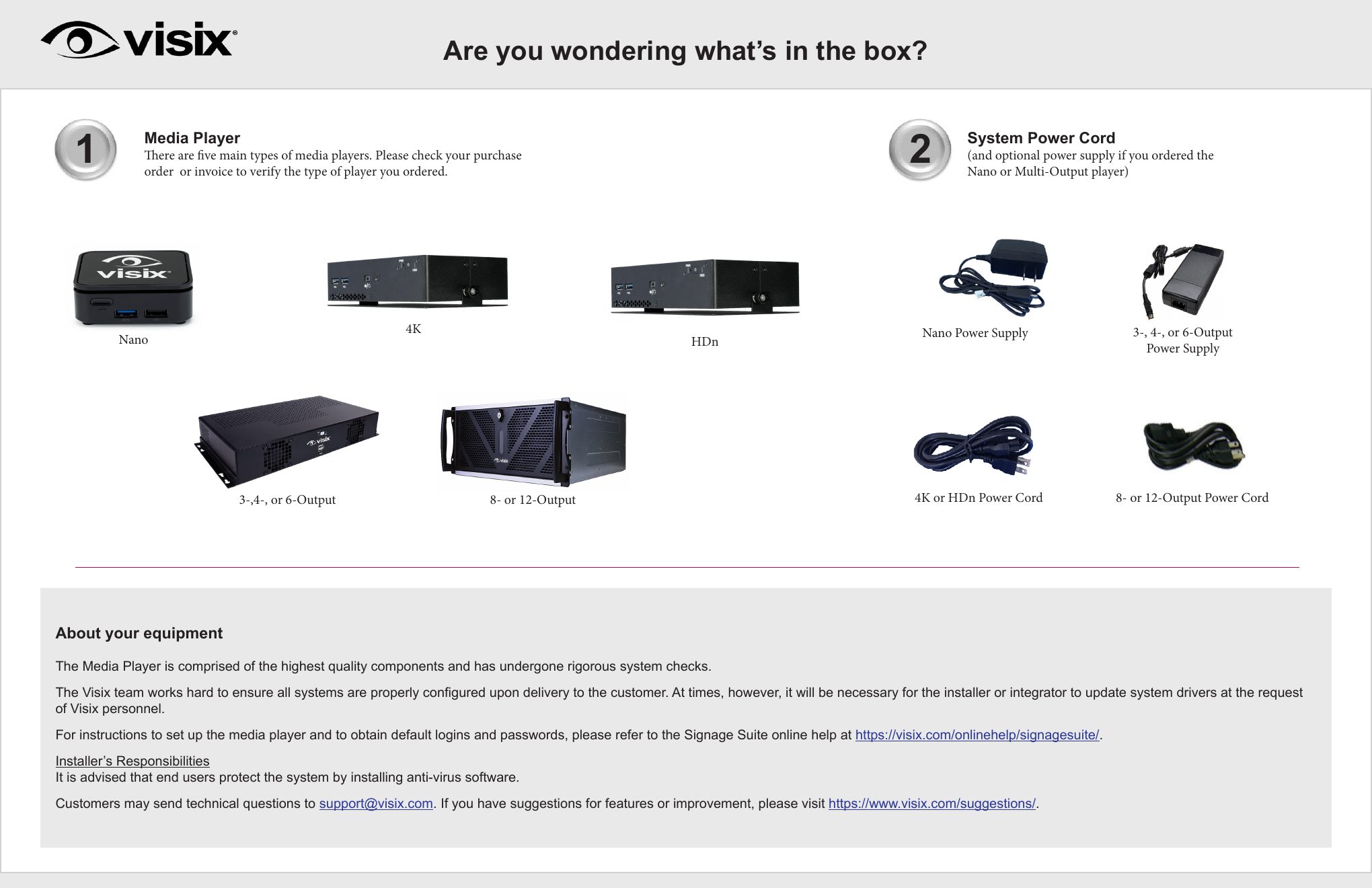
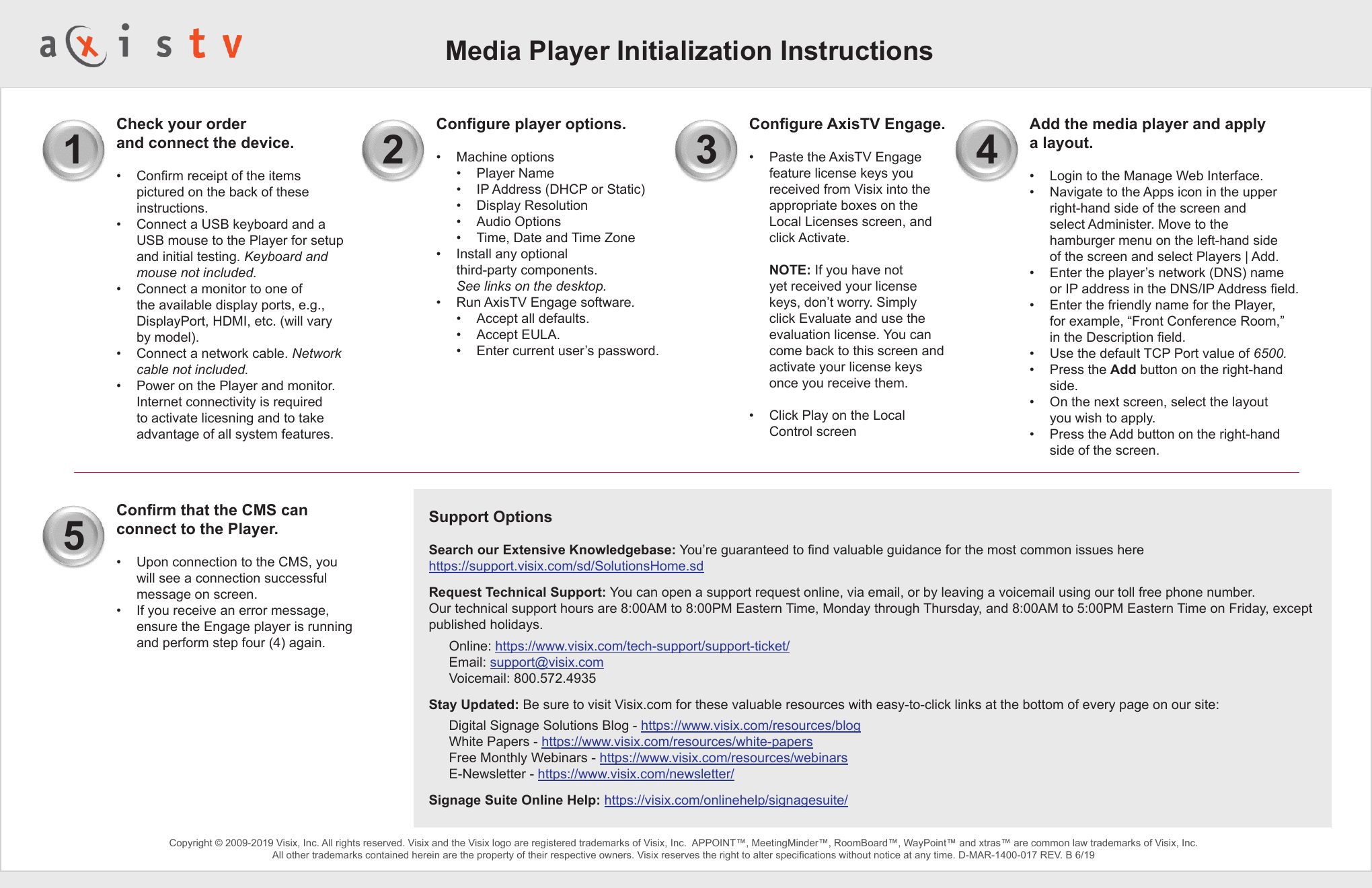
The card that ships with every media player. Page one answers the question everyone has when they open the box ("Are you wondering what's in the box?") with photos of each player model and power supply. Page two gets the player configured and connected in five numbered steps, then lists where to get help.

Page one of the Visix Media Player setup card, showing photos of five player models and their power cords
Page 1 · what's in the box
Page two of the setup card with five numbered configuration steps and support options
Page 2 · five-step setup
Exym · January 2021Beta setup guide · help center

E-signature beta guide

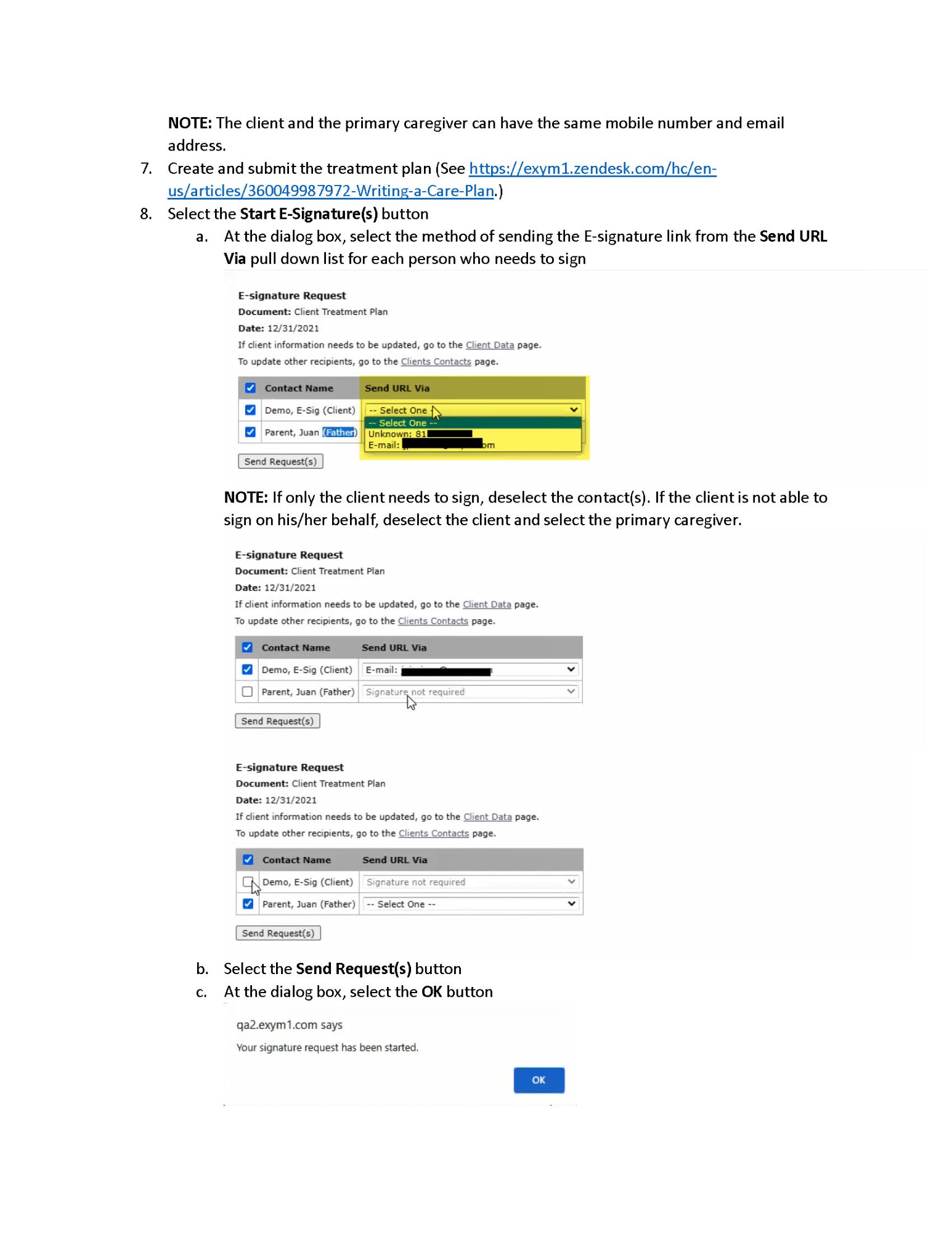
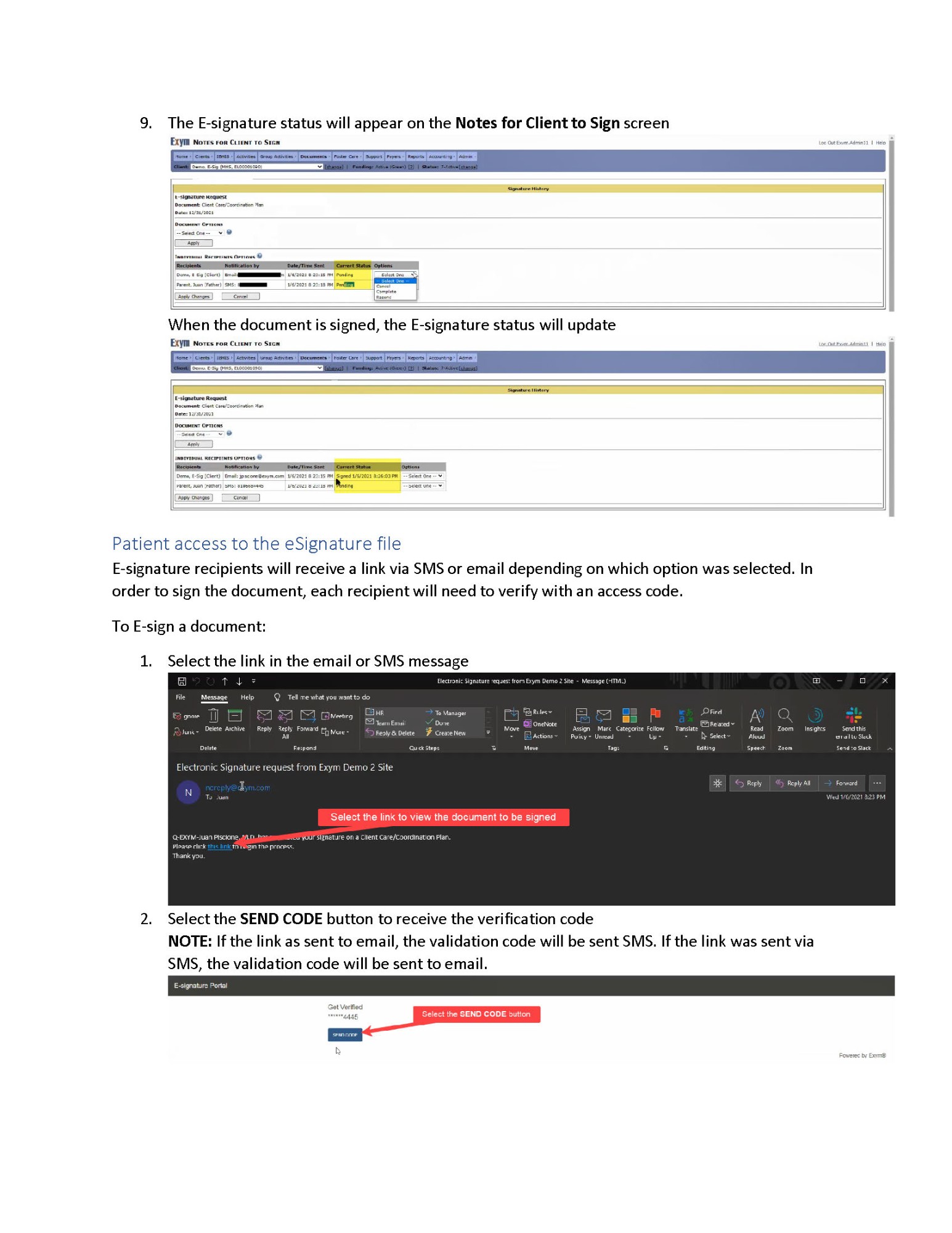
A guide for the ten agencies testing electronic signatures on treatment plans. It walks an administrator from requesting the feature to watching a signature status update, with menu paths spelled out, a "highly recommended" setting called out early, and links to the help articles for each prerequisite.

E-signature guide page for steps 7 and 8, showing the E-signature Request dialog where the administrator picks who signs and whether each link goes by email or text
Steps 7–8 · sending the request
E-signature guide page showing the signature status changing from Pending to Signed, then the signer opening the emailed link and requesting a verification code
Step 9 · tracking and signing
Visix · 201855-page course book

AxisTV Content Creation Training Guide

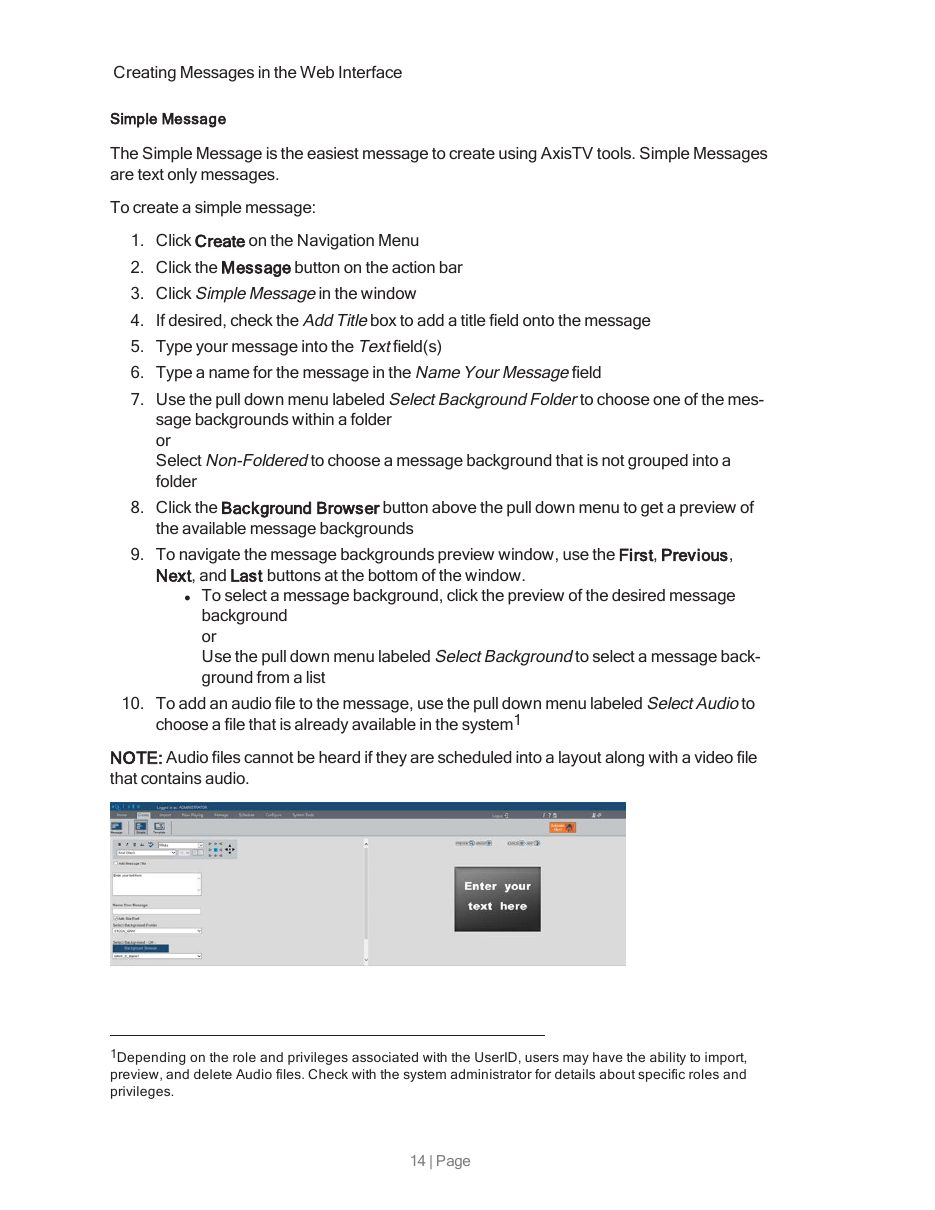
The workbook for a hands-on class. Communications staff learn to build, schedule, and update every message type the system supports, from a simple text slide to messages fed by event calendars and Excel files.

A page from the Content Creation Training Guide explaining how to create a simple message in numbered steps
Page 14 · creating a simple message

Explaining how systems work

Before people can use a product well, they need a mental model of it. These pieces build that model in plain language.

Visix · 201849-page training guide

Introduction to AxisTV

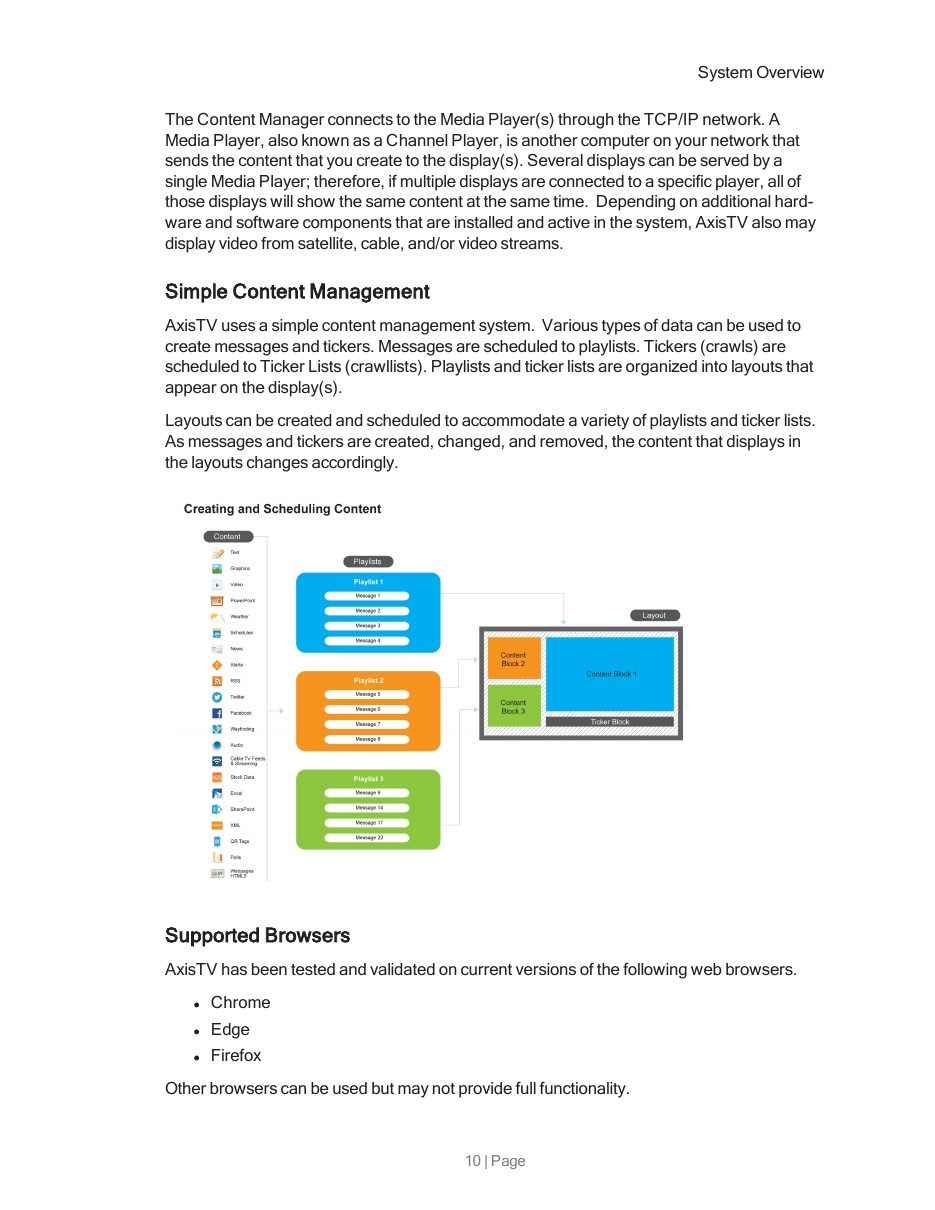
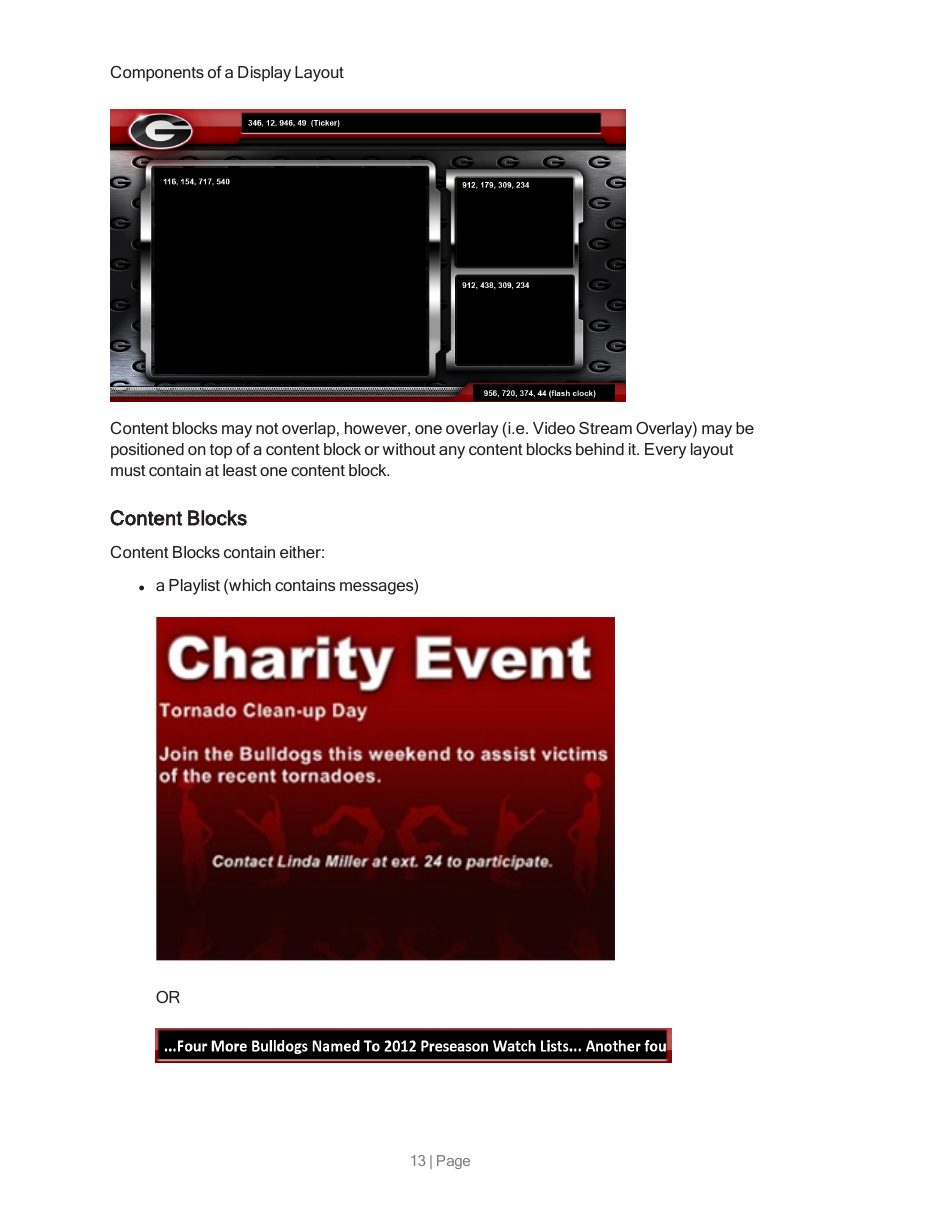
The first course every new customer took. It explains how a content manager, media players, and screens fit together, then breaks a screen layout into its parts (backgrounds, content blocks, overlays, hot spots) so non-technical buyers could plan their own displays.

System overview page with a diagram showing how content flows into playlists and onto a screen layout
How content flows to a screen
Page explaining the components of a display layout with annotated screenshots
Anatomy of a layout
Exym · July 2020One-page decision tree

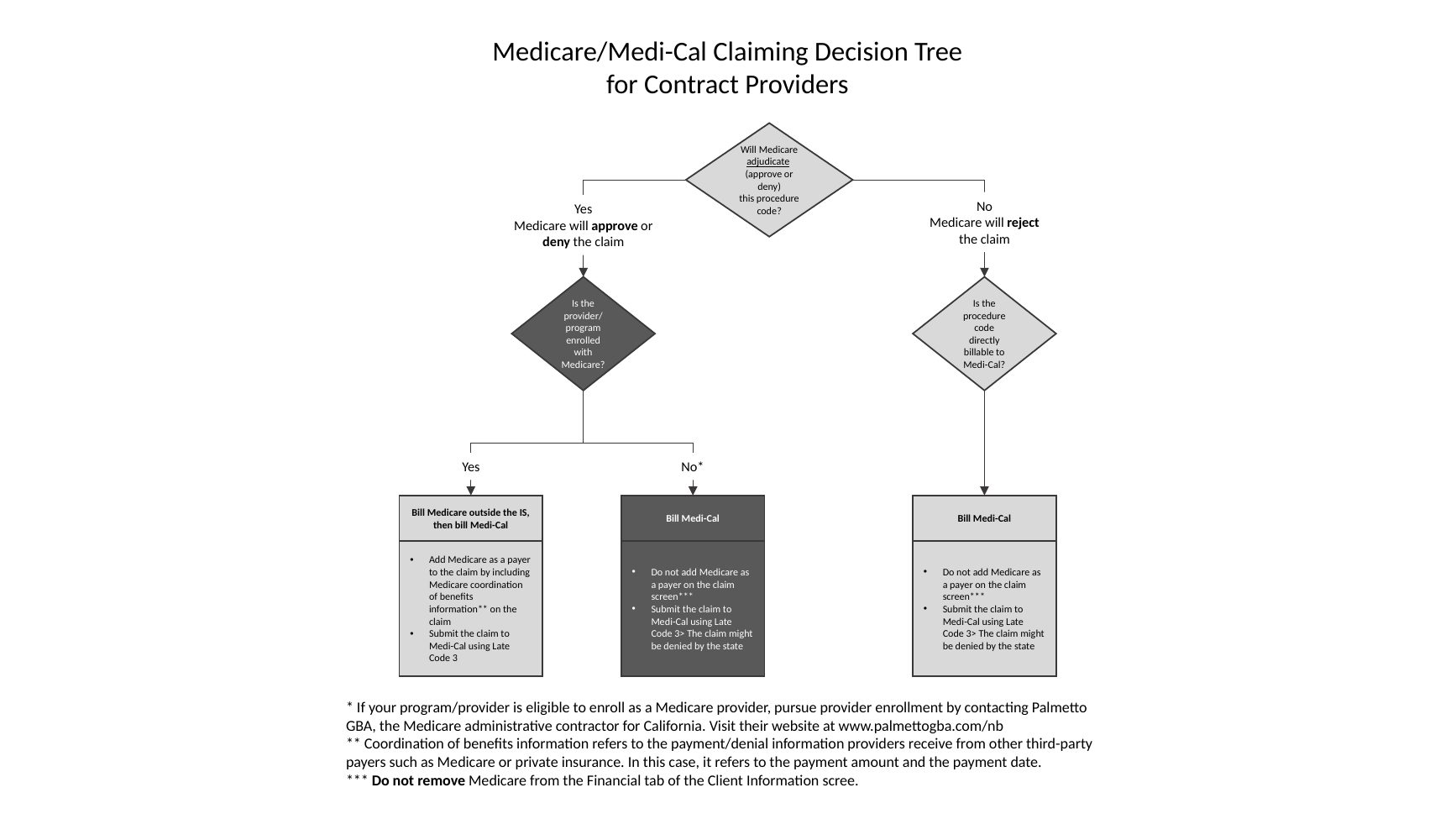
Medicare and Medi-Cal claiming decision tree

Billing staff at contract providers kept asking the same question: when a client has both Medicare and Medi-Cal, which one do I bill, and how? Three yes-or-no questions get them to the right answer, with footnotes for the exceptions.

Flowchart titled Medicare/Medi-Cal Claiming Decision Tree for Contract Providers
Decision tree
Exym · 2020 to 2021Client newsletter articles

Troubleshooting, written as a short read

Two newsletter pieces that turned support-ticket patterns into something people would read. "Top 10 Reasons Claims End Up on the Claims with Problems Screen" lists the missing fields that block billing, in the order people hit them. "What's Under the Hood?" shows billers the fifteen checks the billing engine runs before a claim goes out.

Read the opening of "Top 10 Reasons"

Sometimes it is hard to understand why claims are not billed. The first step in figuring out why a claim has not successfully been billed is to review all data screens for completeness. Here are the top 10 reasons claims end up on the Claims with Problems Preventing Invoicing screen.

  1. The activity's location does not have a billing provider ID specified.
  2. The activity's location does not have a service location ID specified.
  3. The client does not have a payer account number specified.
  4. The client does not have an active episode as of the date of service.
  5. The client does not have an Episode ID specified for their active episode.

Excerpt · Exym client newsletter, February 2021

Technical depth

Writing for the other end of the scale: server requirements, installation wizards, and release notes.

Visix · 2018116-page installation guide

Signage Suite v1.9 Installation Guide

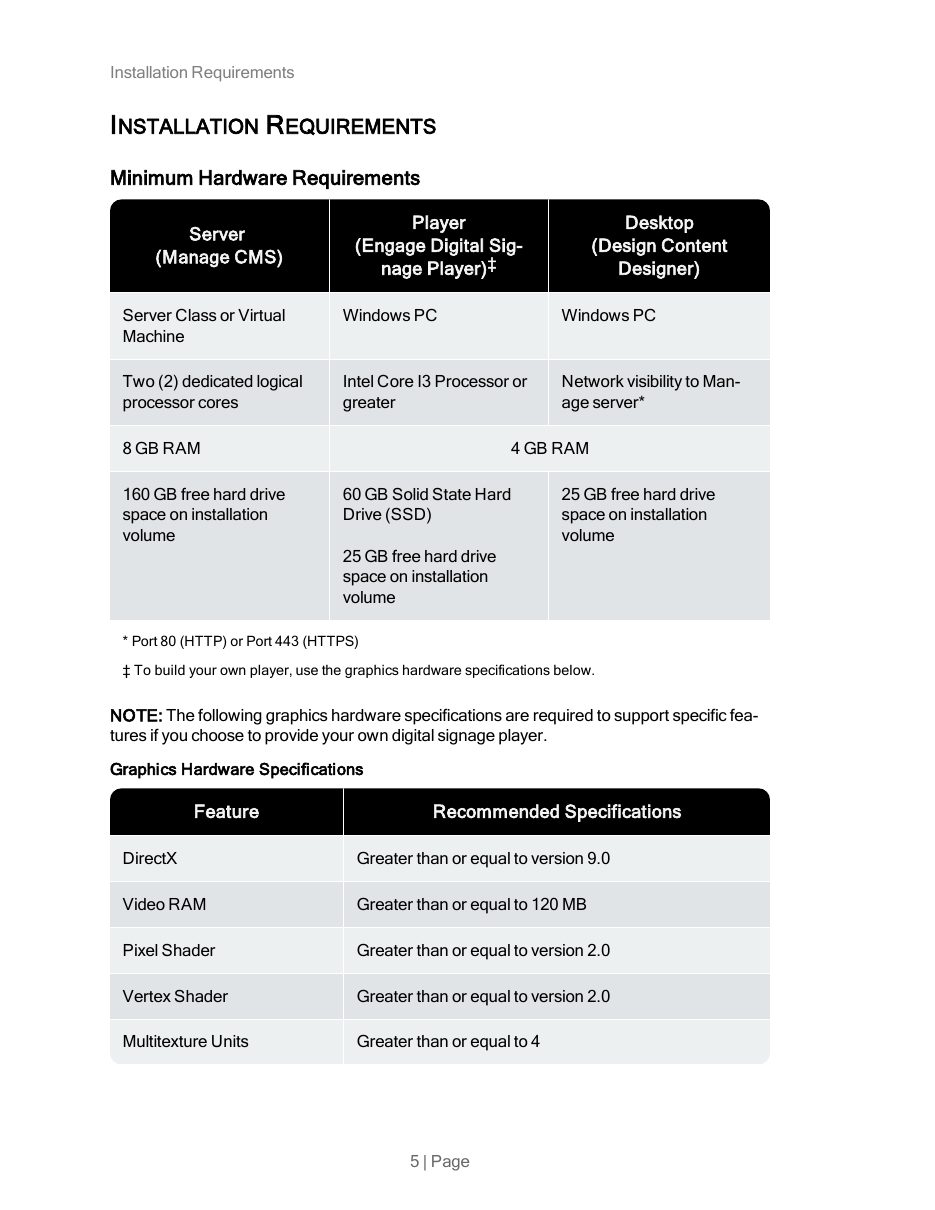
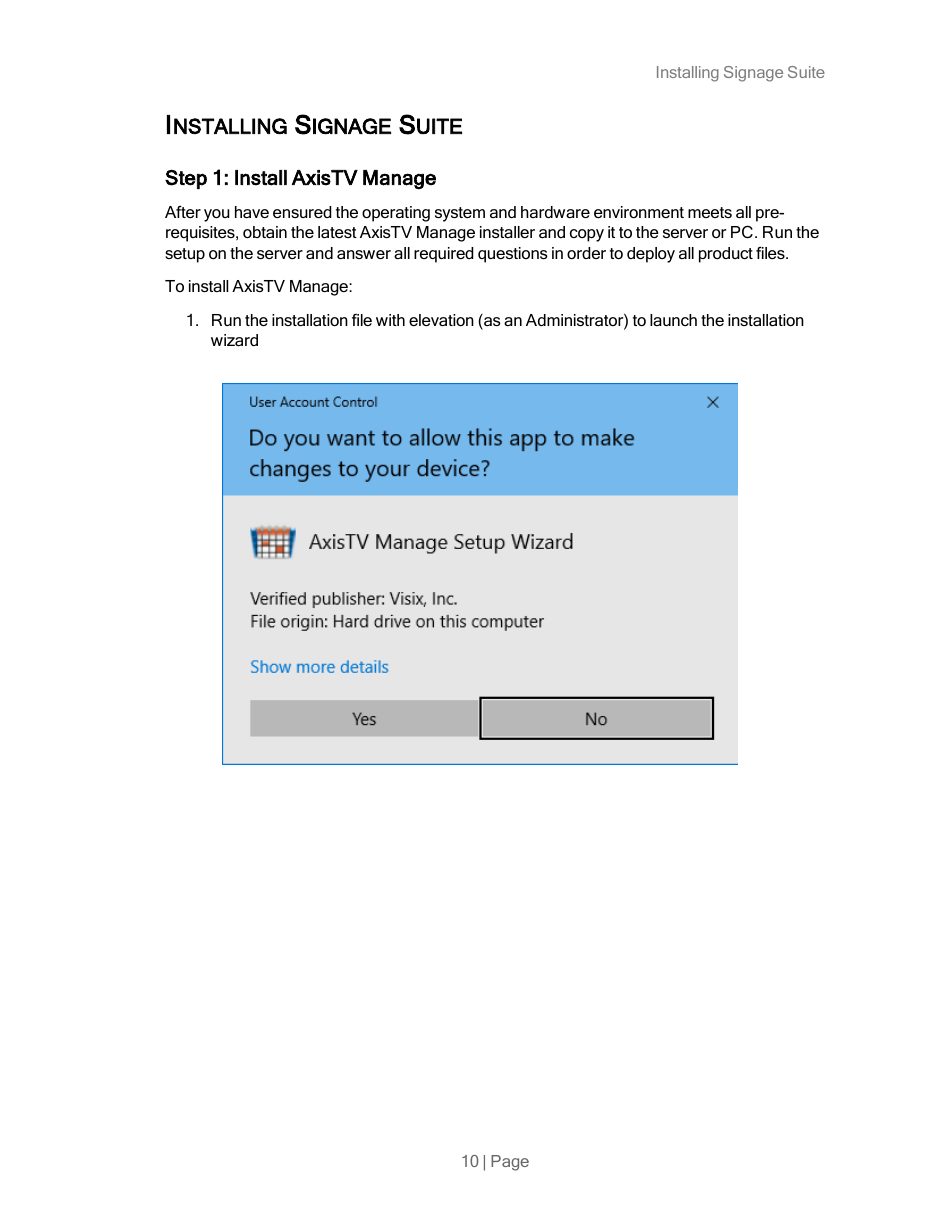
Hardware and software requirements, Windows Server roles and features, firewall ports, and a step-by-step installation of three applications, with screenshots of each wizard screen. Written for IT staff at client sites.

Installation requirements page with hardware tables for server, player, and desktop
Page 5 · requirements
Step 1 of installing AxisTV Manage with a Windows User Account Control screenshot
Page 10 · step 1
Exym · February 2022Release notes

System update release notes

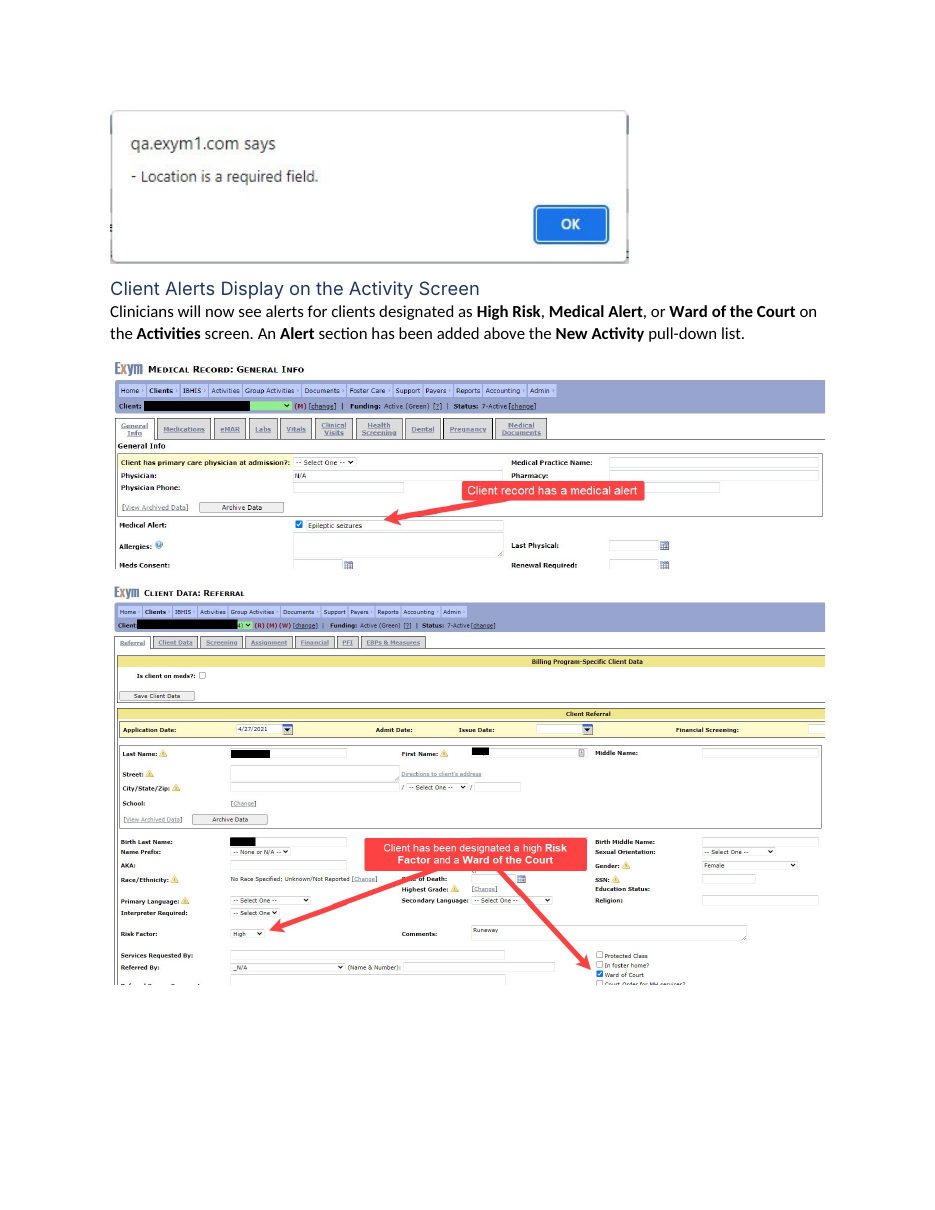
Every feature change described by what users will see and where, with annotated screenshots. At Exym I also moved the release notes and help content into MadCap Flare so they could be published as online help.

Release notes page with screenshots annotated in red showing new client alert fields
System Update, 02/23/2022

Writing for client engagement

I started and ran Visix's monthly customer webinar series and wrote the scripts. These sessions had the highest attendance in the series.

Visix · May 201230-minute webinar · outline and script

Talking to a Moving Target

Advice on writing for digital signs, where a reader gives you about ten seconds as they walk past: keep it simple, call people to action, repeat the key message, and chunk information so people remember it.

Read part of the script

People are walking past our digital displays and they have tons of other information vying for their attention: print ads, text messages, phone calls, apps of various kinds and all manner of digital marketing. How will you get them to pay attention to your message, remember it, and act on it?

It's easy to say "well, all I have to do is tell people about the great event and they'll flock to it." Unfortunately, you've got a lot of competition for your audience's attention and they may not even recall your message by the time they turn the corner.

Excerpt · webinar script, 2012

Need documentation or training like this?

Get in touch